Educational Tools · Free online tool
Free Resume Maker (17 Templates)
Create unlimited free CVs using 17 templates and your phone. This Resume Builder works with Computer, Mobile, and Tablet Browsers


Create a Resume Without Design Software
This free resume maker guides you through the important sections of a CV without requiring Microsoft Word or design experience. Start by choosing one of the 17 templates, then add your profile, education, work history, skills, and projects.
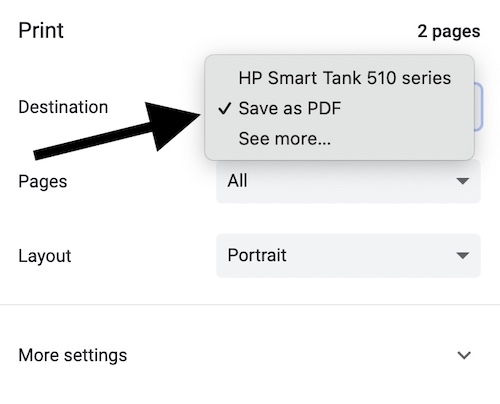
How to Download
When you click on the Download link, you will get the print option. Select Save as PDF from the Destination drop-down list, and then click the Save button.
How to Build Your Resume
- Choose a template. Pick a design that suits your industry and the amount of information you want to include.
- Add your profile. Enter your name, role, contact details, summary, and an optional image URL.
- Complete each section. Use the Education, Work, Skills, and Projects steps to build the main content.
- Review the preview. Check spelling, dates, links, spacing, and page length before opening the Download option.
Adding a Profile Photograph
The current builder accepts an image URL rather than uploading a photograph. If your chosen template includes a photo, use a direct HTTPS image address that can be opened publicly. A profile photograph is optional, and many professional resumes work better without one depending on local hiring practices.
Tips for a Stronger Resume
Keep the summary focused on the role you want, use clear job titles, and describe measurable results instead of listing duties alone. Put the most recent experience first and remove information that does not support your application. Before downloading, confirm that email addresses, telephone numbers, employment dates, and portfolio links are correct. The template provides the presentation, but accurate and concise content is what makes the resume effective.