
The Internet of Things (IoT): Complete Guide to Parts, Uses, and Real Examples
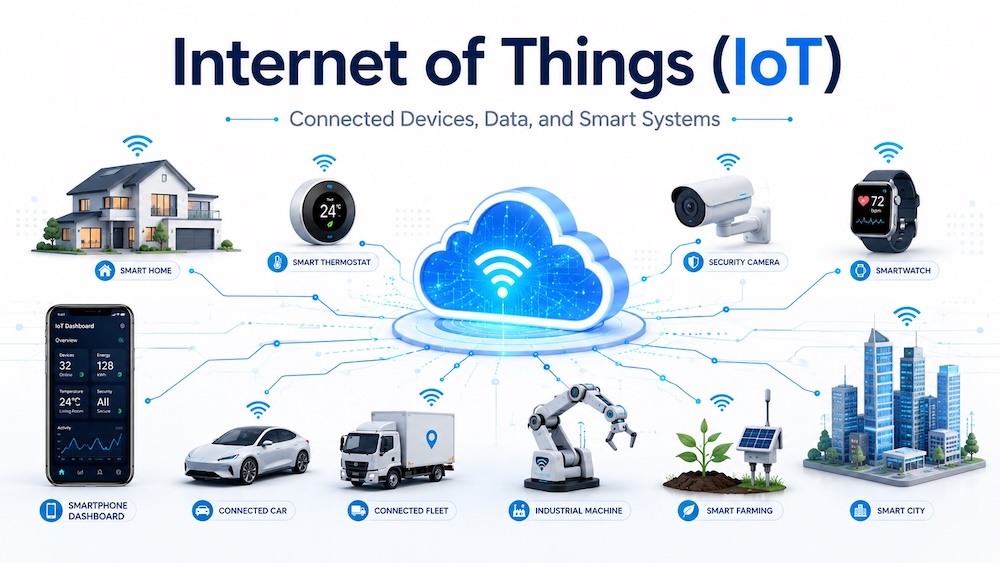
The Internet of Things, or IoT, connects real objects to software. These objects collect data, send it through a network, and help people make better decisions. Some systems also act on that data without waiting for a person. A smart thermostat reads room temperature and changes the cooling. A delivery tracker sends location data from a truck. A factory sensor warns the team before a motor fails.
IoT sounds complex at first. The idea stays simple. A physical thing gets sensors, a small computer, network access, and software. These parts work together. They turn normal items into connected devices.
Businesses use IoT to save energy, reduce waste, track assets, improve safety, and fix problems faster. Homes use it for lights, cameras, locks, speakers, appliances, and climate control. Farms use it for soil, water, weather, and animal tracking. Hospitals use it for remote health checks, equipment tracking, and patient care alerts.
A useful IoT system does not start with a device. It starts with a clear problem. The device only matters when it measures the right thing, sends useful data, and helps someone act at the right time.
What Is IoT?
IoT means Internet of Things. It describes physical objects that connect to the internet or to a private network. These objects use sensors, software, and network tools to collect and share data.
A “thing” can be small or large. It can be a home motion sensor, a smart watch, a vending machine, a restaurant freezer, a warehouse scanner, a farm water pump, a traffic light, or a machine in a factory.
The main goal stays the same. IoT helps people see what happens in the real world. It also helps systems react faster.
Simple IoT Example
Think about a cold storage freezer in a cafe. The freezer has a temperature sensor. The sensor reads the temperature every few minutes. A small controller sends the reading to an app. The app shows the current temperature. It also sends an alert when the freezer gets too warm.
That one system has many IoT parts. It has a sensor, a device controller, network access, cloud software, a dashboard, an alert rule, and security settings. Each part has a clear job.

Main Parts of IoT
An IoT system uses several layers. Each layer handles one part of the job. A home gadget may hide these parts inside one device. A factory system may spread them across many machines, gateways, servers, and apps.
| IoT Part | What It Does | Simple Examples |
|---|---|---|
| Physical thing | The real object that needs tracking, control, or monitoring. | Freezer, car, pump, door, shelf, motor, light, water tank. |
| Sensor | Measures something from the real world. | Temperature, motion, light, air quality, pressure, moisture, vibration. |
| Actuator | Does an action after the system gives a command. | Relay, valve, motor, lock, alarm, fan, pump, light switch. |
| Controller | Reads sensor data and runs device logic. | Microcontroller, embedded board, industrial controller, smart module. |
| Firmware | Runs inside the device and controls its basic behavior. | Code that reads a sensor, sends data, sleeps, wakes up, or updates. |
| Connectivity | Moves data from the device to another system. | Wi-Fi, Bluetooth Low Energy, Zigbee, Thread, cellular, LoRaWAN, Ethernet. |
| Gateway | Connects local devices to the wider network. | Smart home hub, industrial gateway, LoRaWAN gateway, store router. |
| Edge computing | Processes data near the device. | Camera detects motion locally before sending an alert. |
| Cloud platform | Stores data, runs rules, manages devices, and connects apps. | Device registry, message broker, data store, rule engine, update service. |
| Dashboard or app | Shows data to people and lets them control the system. | Mobile app, web dashboard, control room screen, maintenance app. |
| Integration | Connects IoT data with other software. | Point-of-sale system, inventory tool, repair ticket system, billing software. |
| Security | Protects devices, data, users, and networks. | Device identity, encryption, access control, updates, logs, secure setup. |
IoT Architecture Diagram
IoT architecture means the way the parts connect. A simple system sends sensor data to software. A stronger system also sends commands back to devices. This two-way flow helps the system monitor and control real-world work.

How IoT Works Step by Step
- A sensor measures something. It may measure heat, movement, water level, vibration, air quality, light, weight, location, or sound.
- The controller reads the value. It may run a small rule. For example, it can ignore normal readings and send only useful changes.
- The device sends the data. It uses a network such as Wi-Fi, Bluetooth Low Energy, cellular, Thread, Zigbee, Ethernet, or LoRaWAN.
- A gateway may collect the data. Some systems need a hub because the device uses a local radio network.
- Edge or cloud software checks the data. The software stores readings, runs rules, finds patterns, and sends alerts.
- A dashboard shows the result. A person can see status, history, alerts, maps, charts, and device health.
- An action happens. A person may act, or the system may send a command to an actuator.
Sensors in IoT
Sensors give IoT systems their eyes and ears. They turn real-world changes into data. The right sensor matters more than the most expensive device. A wrong sensor gives poor data, and poor data creates poor decisions.
| Sensor Type | What It Measures | IoT Example |
|---|---|---|
| Temperature sensor | Heat or cold | Freezer monitoring, smart thermostat, server room alert. |
| Humidity sensor | Moisture in air | Greenhouse control, warehouse storage, museum protection. |
| Motion sensor | Movement in an area | Smart lights, security alerts, room occupancy tracking. |
| Pressure sensor | Force, air pressure, or liquid pressure | Water pipe monitoring, tire pressure, industrial pumps. |
| Vibration sensor | Shaking or unusual movement | Machine health checks, motor fault warnings, bridge monitoring. |
| Light sensor | Brightness | Street lights, plant growth systems, smart blinds. |
| Gas sensor | Smoke, carbon monoxide, gas leaks, air quality | Kitchen safety, factory safety, smart buildings. |
| Location sensor | Position or movement path | Vehicle tracking, delivery tracking, asset tracking. |
| Soil moisture sensor | Water in soil | Smart irrigation, farm automation, garden watering. |
| Current sensor | Electric current use | Energy monitoring, equipment fault detection, smart plugs. |
Actuators in IoT
Sensors read. Actuators act. An actuator changes something in the real world. It can switch a device on, move a part, open a valve, lock a door, or sound an alarm.
| Actuator | What It Does | Example Use |
|---|---|---|
| Relay | Switches power on or off | Turns a fan, pump, lamp, or heater on. |
| Motor | Creates movement | Moves a camera, opens a gate, or runs a conveyor belt. |
| Valve | Controls liquid or gas flow | Starts irrigation or shuts off a leaking pipe. |
| Smart lock | Locks or unlocks a door | Controls room access in a home, hotel, or office. |
| Alarm | Makes a sound or signal | Warns staff about smoke, heat, water, or entry. |
| Display | Shows a message or value | Shows queue number, shelf price, machine status, or room data. |
IoT Connectivity and Protocols
Connectivity moves data. A small sensor in a field does not need the same network as a security camera. Battery life, distance, speed, cost, and signal strength all matter.
People often mix two ideas here. A network technology moves the signal. A messaging protocol formats the data. Wi-Fi and LoRaWAN move data. MQTT and HTTP help devices and apps exchange messages.
| Technology or Protocol | Plain Meaning | Good For | Common Example |
|---|---|---|---|
| Wi-Fi | Local wireless internet in homes and buildings. | Devices with power access and medium to high data needs. | Cameras, smart speakers, appliances, point-of-sale devices. |
| Bluetooth Low Energy | Short-range wireless made for low power use. | Wearables, beacons, nearby sensors, phone-connected devices. | Fitness bands, smart tags, medical sensors. |
| Zigbee | Low-power local mesh network for smart devices. | Smart home and building sensors. | Bulbs, switches, motion sensors, plugs. |
| Thread | Low-power mesh network based on Internet Protocol. | Smart home devices that need fast local response. | Locks, lights, sensors, thermostats. |
| Matter | A smart home standard that helps devices work across brands. | Smart homes with products from different makers. | Light, plug, lock, sensor, thermostat, and controller setups. |
| Cellular | Mobile network access through a SIM, eSIM, or built-in cellular module. | Moving devices or devices far from Wi-Fi. | Vehicle trackers, payment terminals, outdoor meters. |
| LoRaWAN | Long-range, low-power network for small messages. | Battery sensors spread across wide areas. | Farm sensors, water meters, city sensors, parking sensors. |
| Ethernet | Wired network connection. | Stable systems that need strong reliability. | Industrial controllers, cameras, gateways, building systems. |
| MQTT | Light messaging method where devices publish data to topics. | Low-bandwidth IoT messages and device-to-cloud data. | A freezer sends “temperature/freezer-1” readings to the cloud. |
| HTTP | Web-style request and response messaging. | Simple app connections and web APIs. | A device sends data to a web endpoint. |
| CoAP | Light web-style messaging for constrained devices. | Small devices with limited power and bandwidth. | Low-power sensors in local networks. |
What an IoT Message Looks Like
An IoT message should stay clear. It needs the device name, time, reading, unit, and status. This helps software read it. It also helps people debug it.
{
  "device_id": "cafe-freezer-01",
  "device_type": "temperature_sensor",
  "location": "Main kitchen",
  "timestamp": "2026-06-28T09:30:00+04:00",
  "temperature_celsius": -12.4,
  "battery_percent": 82,
  "status": "warning"
}
This message tells the system that the freezer temperature reached a warning level. The cloud app can save the data, show it on a dashboard, and send an alert to staff.
Gateways and Edge Computing
A gateway acts like a local bridge. It may collect data from many small devices and send it to the internet. It can also translate one protocol into another. A Zigbee sensor may talk to a hub. The hub then sends data through Wi-Fi or Ethernet.
Edge computing means local processing near the device. It helps when the system needs fast action, lower internet use, or better privacy. A security camera can detect motion on the device and send only important clips. A factory gateway can stop a machine when vibration crosses a danger limit.
| Edge Computing | Cloud Computing |
|---|---|
| Works near the device. | Works in online servers. |
| Gives faster local response. | Handles large storage and deeper analysis. |
| Can keep sensitive data local. | Helps teams view data from many sites. |
| Good for cameras, machines, alarms, and offline sites. | Good for dashboards, reports, updates, and long-term trends. |
Cloud Platform in IoT
The cloud platform gives an IoT system its main control center. It can register devices, receive messages, store data, run rules, send alerts, and connect with other apps.
A strong IoT platform usually includes these tools:
- Device registry: a list of approved devices.
- Device identity: a unique ID and secure credentials for each device.
- Message broker: software that receives and routes device messages.
- Rules engine: logic that checks data and triggers actions.
- Data storage: a place for readings, events, and history.
- Analytics: tools that find patterns and problems.
- Alert system: email, SMS, app, or dashboard warnings.
- Update service: a safe way to update device software.
- Access control: permissions for users, apps, and devices.
Data Analytics in IoT
IoT creates time-based data. This means each reading has a time stamp. The data becomes useful when the system compares readings, finds changes, and shows patterns.
For example, one vibration reading from a motor may not tell much. A month of readings can show that the motor has started to shake more each week. That trend can warn the maintenance team before the motor fails.
| Analytics Type | What It Tells You | Example |
|---|---|---|
| Live status | What happens right now. | Room temperature is 25°C. |
| Trend analysis | How a value changes over time. | Energy use rises every evening. |
| Threshold alert | When a value crosses a limit. | Freezer temperature is too high. |
| Anomaly detection | When data looks unusual. | A pump uses more power than normal. |
| Predictive maintenance | When equipment may need service soon. | A motor shows signs of bearing wear. |
| Optimization | How to improve a process. | Adjust cooling schedule to cut energy waste. |
Device Management
IoT devices need care after installation. A company may install ten sensors at first. Later, it may have thousands. Without device management, teams lose track of hardware, software versions, battery levels, and failures.
Good device management includes:
- Device onboarding with a safe setup process.
- Device inventory with location, type, owner, and status.
- Remote configuration for settings and limits.
- Firmware updates to fix bugs and security issues.
- Battery and signal checks.
- Logs for troubleshooting.
- Retirement steps when a device leaves service.
IoT Security and Privacy
IoT security matters because connected devices touch the real world. A weak camera, router, lock, sensor, or machine controller can create risk. The risk can affect privacy, safety, business data, and normal operations.
A secure IoT system needs protection at each layer. The device needs a unique identity. The connection needs encryption. The app needs access control. The software needs updates. The business needs clear rules for data collection and storage.
| Security Area | What to Do | Why It Matters |
|---|---|---|
| Device identity | Give each device its own secure identity. | The system can reject fake devices. |
| Strong setup | Avoid shared default passwords. | Attackers often try common passwords first. |
| Encryption | Protect data during transfer. | It helps stop data theft and tampering. |
| Access control | Give users and apps only the access they need. | A small account issue should not expose the whole system. |
| Software updates | Patch device firmware and cloud software. | New bugs and weak points appear after launch. |
| Network separation | Keep IoT devices away from sensitive business systems. | A weak device should not give easy access to other systems. |
| Data minimization | Collect only the data the use case needs. | Less data creates less privacy risk. |
| Monitoring | Track unusual traffic, errors, and device behavior. | Teams can spot problems earlier. |
Real Examples of IoT
Smart Home
A smart home may use connected lights, locks, cameras, thermostats, speakers, plugs, smoke alarms, and water leak sensors. A motion sensor can turn on a hallway light at night. A smart thermostat can reduce cooling when nobody stays home. A water leak sensor can warn the owner before damage grows.
Restaurants and Cafes
Restaurants can use IoT for freezer monitoring, kitchen temperature checks, energy tracking, smart lighting, air quality, queue screens, and connected ordering systems. A cafe can track milk fridge temperature, coffee machine use, and customer foot traffic. These readings can help managers reduce waste and plan maintenance.
Retail Stores
Retail stores use IoT for smart shelves, stock tracking, footfall counting, digital price tags, energy control, and security. A smart shelf can alert staff when a product runs low. A store can track cold drinks, frozen food, or medicines that need the right temperature.
Factories
Factories use IoT to monitor machines, tools, production lines, energy use, air pressure, and worker safety. A vibration sensor can warn the team before a machine breaks. A power sensor can show which line uses too much energy.
Farming
Farms use IoT for soil moisture, irrigation, weather stations, animal tracking, greenhouse control, and water tank levels. A soil sensor can help a farmer water only when the crop needs it. This can cut waste and protect the crop.
Healthcare
Healthcare teams use connected devices for patient monitoring, medicine storage, equipment tracking, and hospital room conditions. A wearable device can track heart rate or activity. A cold storage sensor can protect vaccines and lab samples.
Logistics and Delivery
Logistics teams use IoT to track vehicles, containers, pallets, fuel use, driver behavior, and package conditions. A sensor can show whether a shipment stayed cold during transport. A location tracker can help teams plan routes and reduce delays.
Smart Cities
Cities use IoT for traffic lights, parking sensors, air quality, street lighting, water meters, waste bins, and public safety systems. A connected street light can dim when roads stay empty and brighten when people pass.
Energy and Utilities
Utility companies use smart meters, grid sensors, transformer monitors, solar monitoring, and leak detection. A smart meter helps customers see energy use. A water meter can show unusual flow that may point to a leak.
Schools and Offices
Schools and offices use IoT for attendance, indoor air quality, smart lighting, room booking, security, energy use, and maintenance. A room sensor can show whether a meeting room stays empty. The building system can reduce cooling in unused spaces.
Complete IoT Use Case: Smart Irrigation
A smart irrigation system shows how the parts work together. The problem is simple. A field needs water, but too much water wastes money and harms plants.
- A soil moisture sensor checks how much water sits in the soil.
- A weather sensor checks rain, heat, and humidity.
- A controller reads the sensor values.
- The device sends readings through LoRaWAN or cellular.
- The cloud app stores the readings and checks the watering rule.
- The dashboard shows soil moisture across the field.
- The system opens a valve when the soil gets too dry.
- The system closes the valve when moisture reaches the target level.
- The farmer gets an alert when the pump fails or the water tank runs low.
This system does more than turn water on and off. It creates a record. The farmer can see which area dries faster, which crop needs more water, and where a sensor may have failed.
IoT Benefits
IoT works best when it gives clear value. A connected device should not add work without a reason. The best systems reduce manual checks, cut waste, improve response time, or show problems before they grow.
| Benefit | How IoT Helps | Example |
|---|---|---|
| Less waste | Tracks temperature, water, energy, stock, and machine use. | A freezer alert prevents food loss. |
| Faster repair | Shows faults before users report them. | A pump alert creates a repair ticket. |
| Better safety | Monitors gas, smoke, heat, pressure, and movement. | A gas sensor warns kitchen staff. |
| Lower energy use | Controls lights, cooling, motors, and appliances. | A building reduces cooling in empty rooms. |
| Better stock control | Tracks shelves, products, tools, and assets. | A store knows when a shelf needs restocking. |
| Better customer service | Shows delays, queues, faults, and item status. | A restaurant sees when a pickup order is ready. |
IoT Challenges
IoT can fail when teams ignore the small details. Weak signal, short battery life, poor data quality, unclear alerts, and missing updates can hurt the system.
- Battery life: small sensors need careful sleep cycles and low-power networks.
- Network coverage: basements, kitchens, warehouses, farms, and factories can have weak signals.
- Data quality: wrong sensor placement can create wrong readings.
- Too many alerts: staff may ignore alerts when the system sends too many small warnings.
- Security gaps: old firmware and weak passwords create risk.
- Vendor lock-in: some devices only work with one app or cloud system.
- Maintenance: devices need updates, battery checks, cleaning, and replacement.
- Privacy: cameras, wearables, and location trackers need clear data rules.
How to Choose the Right IoT System
A good IoT project starts small. One strong use case gives better results than a large system with unclear goals.
- Define the problem. Write the exact issue. Example: “We lose frozen stock because staff notice freezer faults too late.”
- Choose the right sensor. Pick the reading that proves the problem.
- Place the sensor correctly. Sensor location can change the result.
- Pick the network. Match the network to range, power, speed, and cost.
- Set useful alerts. Alert only when a person needs to act.
- Plan security from day one. Do not add security after launch.
- Plan device care. Include updates, batteries, repairs, and replacement.
- Measure value. Track savings, fewer faults, lower waste, or faster response.
IoT in Business
Businesses use IoT when real-world data affects money, safety, service, or quality. A small shop may only need freezer alerts and energy tracking. A large factory may need thousands of sensors across machines, motors, pumps, tools, and safety systems.
IoT also helps teams move from fixed schedules to condition-based work. Instead of checking every machine at the same time each week, the team can check the machine that shows warning signs. This saves time and reduces surprise breakdowns.
IoT and Artificial Intelligence
Artificial intelligence can help IoT systems find patterns in large data sets. It can spot unusual readings, predict failures, classify camera images, and suggest better settings.
The data still needs care. Artificial intelligence cannot fix poor sensor placement, missing values, weak labels, or unclear business goals. A simple rule often works better than a complex model when the problem has clear limits.
Digital Twins and IoT
A digital twin is a software model of a real object, place, or process. IoT data keeps that model updated. A building digital twin can show room temperature, energy use, air quality, and equipment status. A factory digital twin can show machine health and production flow.
Digital twins help teams test ideas before changing the real system. A building manager can compare energy settings. A factory team can study a bottleneck. A city team can view traffic patterns.
Future of IoT
IoT keeps moving toward smaller devices, better batteries, stronger security, and smarter edge processing. Smart home systems also move toward better brand compatibility through standards such as Matter and Thread. Cellular IoT keeps growing through eSIM and low-power cellular options.
The strongest trend is practical use. Companies do not need connected devices for show. They need systems that cut waste, improve safety, reduce downtime, and make daily work easier.
Quick IoT Checklist
| Question | Good Answer |
|---|---|
| What problem will the system solve? | A clear issue with a measurable result. |
| What data does the system need? | Only the readings needed for the use case. |
| How often should the device send data? | Often enough to act, not so often that it wastes power or money. |
| Who needs alerts? | The person who can fix the issue. |
| What happens when the internet fails? | The device or gateway handles the most important local action. |
| How will updates happen? | Through a secure update process. |
| How will old devices leave service? | They get removed from the system and lose access. |
IoT FAQ
What is IoT in simple words?
IoT means connecting real objects to software. These objects collect data through sensors, send it through a network, and help people monitor or control things.
What are the main parts of IoT?
The main parts include sensors, actuators, controllers, firmware, connectivity, gateways, edge computing, cloud software, dashboards, integrations, device management, and security.
Does every IoT device need the internet?
Not always. Some IoT devices work on a local network and only use the internet for remote access, storage, updates, or alerts.
What is the difference between a sensor and an actuator?
A sensor measures something. An actuator does something. A temperature sensor reads heat. A relay can turn a fan on.
Is IoT safe?
IoT can be safe when teams use strong device identity, encryption, access control, updates, network separation, and clear privacy rules. Weak setup creates risk.
What is an example of IoT at home?
A smart thermostat is a common home IoT example. It reads room temperature, checks user settings, and controls heating or cooling.
What is an example of IoT in business?
A restaurant freezer monitor is a business IoT example. It tracks temperature and sends an alert when food storage becomes unsafe.
Final Thoughts
IoT connects the physical world with useful software. It starts with sensors, moves data through networks, checks that data in edge or cloud systems, and helps people act. The best IoT systems stay simple. They measure the right thing, protect the data, and solve a real problem.
A smart home light, a farm moisture sensor, a factory vibration monitor, and a cafe freezer alert all follow the same idea. They read real-world data and turn it into action.