
How to boost iPhone’s battery life with simple steps
Users can easily boost iPhone’s battery life. iPhone is the only mobile that gives you so many options in settings to control the system and apps’ behaviour. So you don’t really need third party apps to control the basic functions of your iPhone. Battery is the primary concern of any users, because the mobile phone companies have improved so many features, like display resolution in mobiles are now more than a laptop or computer, most of the high-end smartphones comes with 64 bit chipset architecture and the display size is also getting bigger with great brightness. So the power consumption of the smartphone has increased, but even the high-end gadgets don’t come with enough battery power.
If you have an iPhone and struggling to boost you iPhone’s battery life, then you just need to follow some steps and you can increase the battery timing. Here you go:
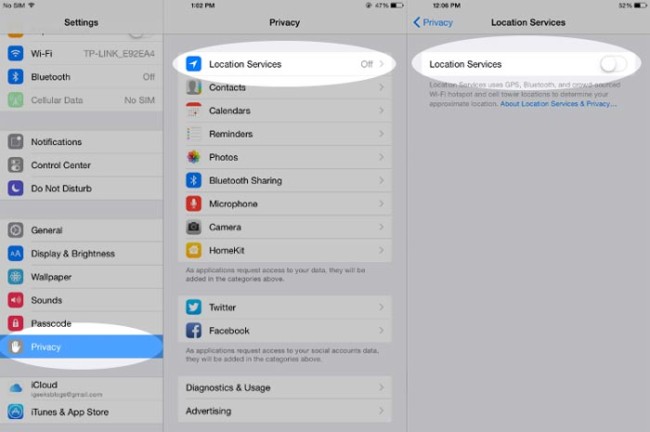
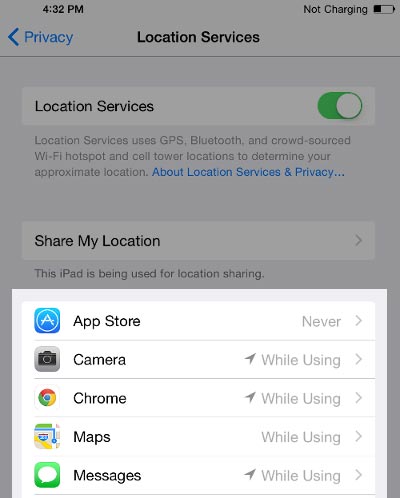 1) Most of the battery consumption happens due to GPS/Location service. Allow only those apps to track your location that you think is necessary, like Map. A photo editing map or a game on your iPhone tracking you location, that doesn’t make any sense. First of all when you start the app first time it does ask if you want to allow the app to track your location, simply tap on No. If you have already selected yes or you want to disable it now, you can do that by going to iPhone Settings –> Privacy –> Location Services –> Select App. If the location service is off for all app if won’t show any app there, and you don’t need to bother further, but if it’s on, you can see what apps are using the location services and here you can tap on the app and select never if you want to turn off for that app.
 2) If you always increase or decrease the brightness of your iPhone, keep it in automatic mode. Its sensor works well, and adjust the light automatically.
3) When you open an app first time, it asks you if you want to receive notification. Some apps keep sending you annoying notification. For ex: what kind of notification do you expect from a camera or image edition app? If you already receive notification, you can turn it off going to iPhone Settings –> Notifications –> Select App. You can disable it from here.
4) You can also boost your iPhone’s battery life by disabling Cellular Data for apps. If you don’t use some apps outside your home, you can disable cellular data for them (In this case I assume that you use WiFi at home). To display cellular data, go to iPhone Settings –> Cellular –> scroll down and you will see apps name. Now you can disable it here.
5) You can do one more thing to boots your iPhone’s battery life that is keeping the background activity less. Don’t always let the apps run in the background through out the day if you don’t need it.
Note: Location services and Mobile data has severe effect of the battery life, so take care of this.
Now you know how you can boost the iPhone’s battery life. Good luck!