
How to Add Twitter, Blog or News Feed to Safari’s Sidebar
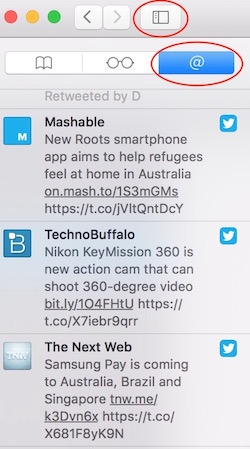 Safari comes with some unique features compared to other browsers. If you don’t want to open your Twitter account each and every time to check update or latest feed, it can be accessed quickly via Safari’s Sidebar. In the same way, you can also add any blog or news site’s feed to keep yourself updated. Feeds appear in the sidebar that can be accessed by clicking on @ sign in browser.
How to add Twitter Feed to Safari’s Sidebar?
- Launch Safari
- Click on Sidebar icon (highlighted in screenshot)
- Click on @ icon
- Click on Subscription (located on the bottom of sidebar)
- Click Add Account, and it will take you to system preferences where you can add an account. Feed can also be added by going to System Preferences –> Internet Accounts
- Click on Twitter now
- Enter your ID and Password, and click on Next
- Click on Sign in
- Now Click on Done (located on the bottom of Safari’s Sidebar)
Now when you click on @ next time, you will find tweeter feeds there. If you are still facing any issue, please watch the video below.
How to add Blog or News feed to Safari’s Sidebar
As we said earlier, you can also add any blog or news website’s feed to Safari’s sidebar. Please follow these steps to do that.
- Launch Safari, browse blog or websites that you want to add to safari’s Sidebar
- Now click on Sidebar icon, and on @ icon, and click on Subscription, just like we did earlier
- Now you have to click on Add Feed, and confirm it
You have added the feed successfully to Safari’s sidebar.
Do you still need help? Watch this video